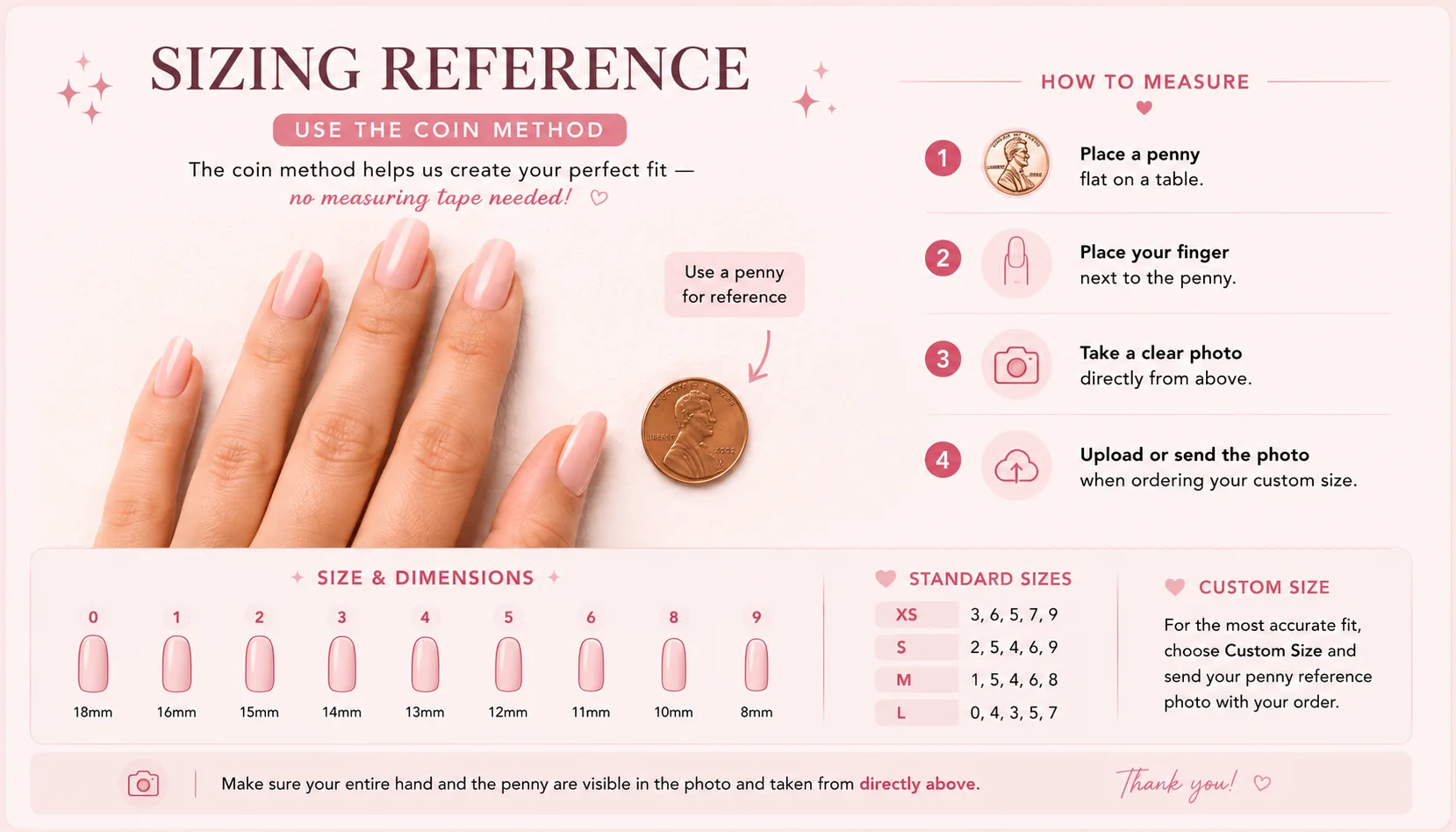
Made by CheyEach product is uploaded and managed from her admin studio.Fit firstSizing, prep, and reuse guidance are built into the customer flow.Easy checkoutCustomers can sign in, save sizes, or check out as a guest.Need help?Email Chey at callison@pressedbychey.com.Small-batch dropsFresh sets arrive in limited runs, so every upload stays personal.Custom by requestHave a specific look in mind? Send Chey your inspo for a custom quote.
Thumb through pinky measurements stay linked to future orders.
03
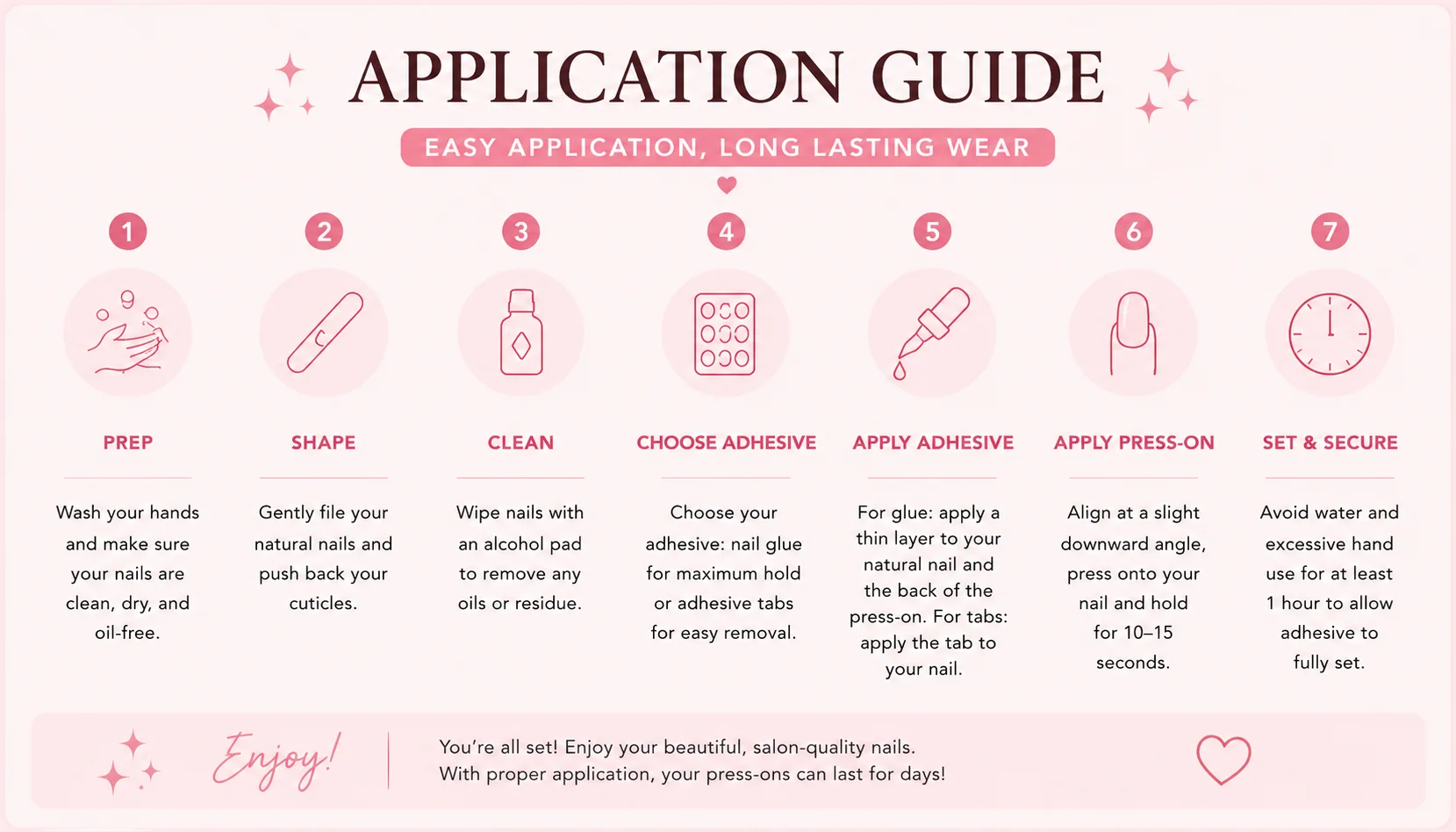
Apply in minutes
Prep, press, cure the look, and remove gently for reuse.
Shop the latest sets
Fresh uploads from Chey's current collection.
Custom Orders
Send Chey your inspo.
Upload a reference photo and write exactly what you want. Your request will be added to your bag as a quote request,
then Chey can review the photo, notes, sizing, and final price before making the set.
1 photo requiredSend the exact nail look Chey should match.
Added to your bagYour request stays with the rest of your order details.
Reviewed before paymentChey confirms sizing, notes, and final pricing first.
Tell Chey what you want
Keep this short and clear. Include shape, length, colors, finish, charms, and nail art.
Upload the inspiration photo
This helps Chey match the exact set you want.
Reference photo uploaded
Customer love
Built for compliments.
"They looked like a $90 salon set and stayed glossy all week."
Maya R.
"The sizing kit made ordering press-ons way less stressful."
Jules T.
"Pink chrome in sunlight is actually unreal."
Ari N.
Customer account
Your quotes and order history.
Keep this page open after sending a custom request. Quotes from Chey refresh automatically here.
Quotes from Chey
New quote prices, messages, and payment status stay synced from the live website.
Live sync ready
Order History
All quote requests and paid orders tied to this customer account.
Saved Sizing
Sign in to see saved sizing.
Saved Favorites
Favorites remain available in the profile editor.
Message Chey
Ask about a fit, a custom design, an order, or your next set.
Live support
Pressed by Chey
Find My Size
Your screen is zoomed in. Pinch out until the page is back to normal zoom so the measurements stay true to size.
Scan one nail at a time
Place one finger flat in the guide with the nail facing the camera.
Capture a photo or choose one from your camera roll.
Review the AI estimate, confirm the pink lines, and save.
No card required. Keep only the selected finger in frame; unclear photos and extra fingers are rejected so you can retake them.
Single-finger scan
Keep only your selected finger in frame. Hold the nail toward the camera and fill most of the guide without cropping the fingertip.
One finger onlyOne finger only - nail fills about one-third of this box
The scanner checks for one hand and one selected finger.
Left thumb
Rest this nail flat on the box below, then drag each pink handle until the lines just touch the widest part of the nail.
15.0 mmSize 4
Measured sizes
Use these results to update the selected customer's Saved sizing record in Customers.
Admin Command Center
Chey Operations
A private operations workspace for orders, product drops, customer requests, and Chey's build notes.
New Incoming Orders
Start here every time Chey logs in. Paid orders show what needs to be made, packed, shipped, or followed up on.
Daily order workflow
Use each order card to move the order from Needs review to Making, Packing, Shipped, or Completed. Chey's private notes stay with the order.
Finance workspace
Accounting & Reconciliation
Keep payment history, revenue review, fulfillment exposure, and month-end work together in one controlled ledger.
Reporting periodAll recorded activity
Use the date controls below to work a close period or review a payout window.
Control pointPaid records are read from the live order ledger and duplicate transaction identities are removed before reporting.
Gross paid$0.00Paid transactions in the ledgerPaid orders0Completed checkout paymentsOutstanding$0.00Unpaid and pending order valueLedger entries0Orders and quote requestsAverage paid order$0.00Gross paid divided by paid ordersPaid to fulfill0Paid orders not yet completedQuote pipeline$0.00Priced quotes not yet paid
Month-end control
Ready for review
Refresh the ledger to calculate the current reconciliation workload.
1 Match paid orders to the payment processor payout report.2 Review paid orders still awaiting fulfillment.3 Record fees, supplies, and owner draws in the bookkeeping system.
Accountant resources
Close the period with clean support
Use the exported CSV as the transaction support file, then attach payout statements, processor fees, supply receipts, and tax workpapers to the matching period.
Revenue supportAR follow-upTax-ready trail
Private books workspace
Operating expense register
Log supplies, software, shipping, contractor costs, and other business expenses for the selected reporting period.
Logged expenses$0.00
0 recordsOpen a record to see customer, items, payment, and fulfillment details.
Customer Messages
Keep every customer conversation, order question, and custom-design update in one place.
Select a customerMessages will appear here.
Customer Accounts
Search the full customer directory, review account activity, and manage profile access from one workspace.
0 accounts
Customers
Page 1
Select a customerAccount details and admin controls will appear here.
People & access
Team
Owners, admins, accountants, and employees live here. Customer accounts stay in the Customers directory.
0 team members
Team membersOwner-controlled roles
Select a team memberRole, access, and account controls will appear here.
Fit studio
Nail Size Finder
Capture one finger at a time, review the AI size estimate, then use the results to update the customer's saved sizing in Customers.
1. CapturePlace one finger in the guide and take a photo.2. ConfirmReview the AI estimate and align the pink lines.3. Save the recordCopy the result into the selected customer's Saved sizing fields.
Ready to measure a customer’s fit.
Catalog Operations
Product Command Center
Manage the catalog Chey actually sells: photos, product numbers, stock, pricing, descriptions, and publishing status in one place.
Catalog0Saved product recordsLive0Visible in the ShopDrafts0Private until publishedIn Stock0Ready to sell nowAttention0Low or out of stock
Showing 0 productsUse product numbers to keep inventory, orders, and customer questions organized.
Advanced live product editor
These are the products customers can see in the Shop. Use the product library above to add more.
Publishing Changes
Changes made here update this storefront right away. On the deployed Netlify site, admin changes are also saved to the live website so products, photos, copy, and layout edits stay visible for customers.
Simple mode: press Click To Edit Site, then click text or photos directly on the website.
Quick Page Content
Update the main customer-facing copy here. Changes save straight into the page.
Page Layout
Show, hide, and reorder the main site pages so the top navigation flows the way you want.

'/%3E%3Ccircle cx='730' cy='126' r='260' fill='url(%23glow)' opacity='.72'/%3E%3Ccircle cx='130' cy='642' r='230' fill='%23edf4ec' opacity='.74'/%3E%3Cg opacity='.82' transform='translate(110 88) rotate(-8 340 300)'%3E%3Crect x='88' y='124' width='92' height='336' rx='46' fill='url(%23nail)'/%3E%3Crect x='210' y='76' width='108' height='414' rx='54' fill='url(%23nail)' opacity='.95'/%3E%3Crect x='356' y='48' width='116' height='470' rx='58' fill='url(%23nail)'/%3E%3Crect x='510' y='92' width='104' height='404' rx='52' fill='url(%23nail)' opacity='.94'/%3E%3Crect x='650' y='170' width='82' height='312' rx='41' fill='url(%23nail)' opacity='.9'/%3E%3C/g%3E%3Cg fill='none' stroke='%238f1d51' stroke-linecap='round' opacity='.24'%3E%3Cpath d='M86 118 C188 58 316 68 404 140' stroke-width='5'/%3E%3Cpath d='M488 602 C608 666 748 632 818 522' stroke-width='6'/%3E%3Cpath d='M150 610 C238 560 302 574 364 640' stroke-width='4'/%3E%3C/g%3E%3Cg fill='%23ffffff' opacity='.82'%3E%3Ccircle cx='632' cy='198' r='7'/%3E%3Ccircle cx='684' cy='236' r='4'/%3E%3Ccircle cx='246' cy='238' r='5'/%3E%3Ccircle cx='564' cy='556' r='6'/%3E%3C/g%3E%3C/svg%3E)